Recovery After Flashing the Wrong Firmware
Flashing firmware intended for another Voge model onto the SR4 Max dashboard leaves the screen corrupted and unusable. As long as the Sansan Dashboard Assistant app still connects, the cluster can be recovered by reflashing the correct SR4 Max firmware over a phone hotspot. Files and full procedure below.
Source: an owner-reported recovery. The reader supplied the firmware files received through Voge support and authorized their publication. That provenance is retained. The reported recovery outcome and its applicability to other clusters are user reports, not Voge-verified guarantees; follow the support document’s package restrictions.
Status: Owner-reported recovery, not a Voge-verified guarantee · Reported fix: Reflash correct firmware via the Sansan Dashboard Assistant app
Symptoms
Dashboard display garbled, flickering or showing corrupted graphics after a firmware flash
Wrong layout or another model's interface on the screen
Cluster unusable, but the bike itself starts and runs
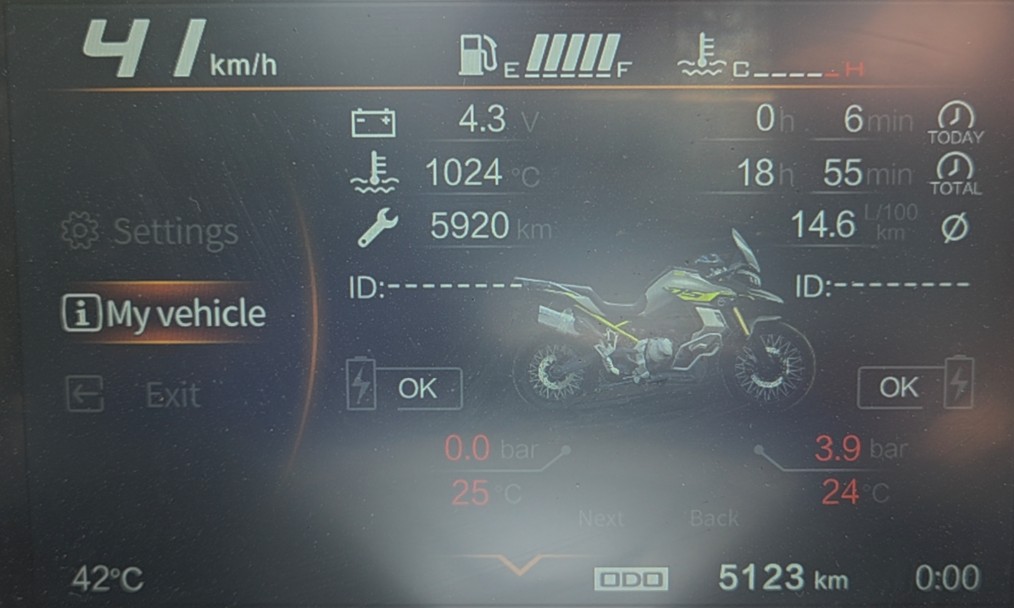
Impossible readings and another model's layout on the My vehicle screen, which may also flicker. In the documented case the cluster reported a coolant temperature of 1024 °C, battery voltage of 4.3 V and a TPMS display belonging to a different bike:
The Sansan Dashboard Assistant flashing app (三三仪表助手) can still connect to the cluster
What's actually happening
The SR4 Max dashboard is a Sansan (Chongqing Sansan Electric Appliance Co.) S5100/S6100 series instrument. The same Sansan flashing app is used across several Voge models, and it performs no compatibility check: it will flash firmware for a different model onto your cluster without complaint. Flash another model's firmware onto an SR4 Max and the display becomes unusable.
A wrong flash of this kind is recoverable. The cluster's update mode still works, so the fix is flashing the correct SR4 Max firmware back on. An SR4 Max Radar owner confirmed this after flashing DS900X firmware onto his cluster: the reflash below restored it using files supplied by Voge's China support through a European dealer.
The same procedure and files also apply if you want to update a working SR4 Max cluster to the latest firmware (SS621X13-03). The manufacturer's document describes the update as adding navigation and mirror link functions, but the owner in the documented case reported no new mirroring functionality after flashing, possibly because these are EU market files. Treat those features as unverified.
Before you start: check the version screen
Open the version screen on the dashboard, under My vehicle in the menu. On a healthy SR4 Max every software code starts with SS621X13, the SR4 Max model code:
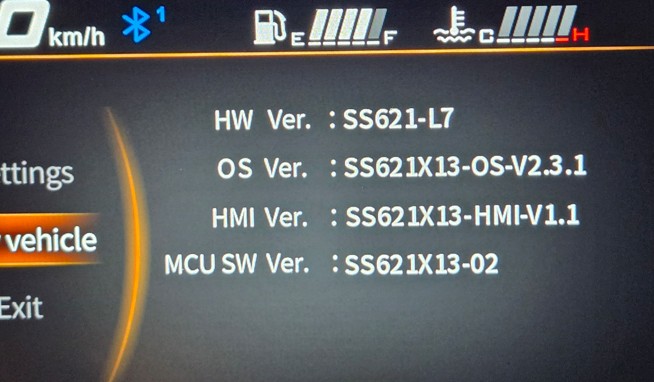
This is the same cluster after the wrong flash. The OS and HMI lines identify the foreign firmware (SS621X11 here), while the MCU SW line still reads SS621X13-02:
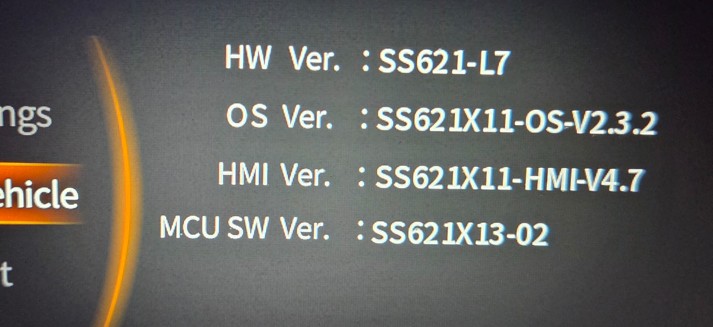
SS621 model codes identified so far, cross-referenced against our firmware tracker: SS621X13 is the SR4 Max, SS621X11 is the DS900X up to 2024, and SS621X15 is the DS900X from 2025 on. The wrong firmware in this case identified itself as SS621X11, so it was pre-2025 DS900X firmware. If your Voge's version screen shows a code not listed here, send it in together with your model.
There are two firmware packages, and both end at SS621X13-03. The manufacturer's instructions state that each package is only for clusters on a specific MCU SW version:
| Package intended for | File | Result |
|---|---|---|
| Clusters on SS621X03 (any release) | sr4max-ss621x03-to-x13-3.30.apk (original name: S6100外销SS621X03换13-3.30.apk) | Updates to SS621X13-03 |
| Clusters on SS621X13 (any release) | sr4max-ss621x13-to-x13-03-3.30.apk (original name: S6100外销SS621X13低状态升级高状态-3.30.apk) | Updates to SS621X13-03 |
That rule was written for updating a cluster still running SR4 Max firmware. In the documented recovery (MCU SW line reading SS621X13-02 after the wrong flash), the owner flashed the SS621X03 package first, which restored full functionality on its own, and then flashed the SS621X13 package as well to follow the instructions completely, with no visible change after the second flash. If your version screen shows neither SS621X03 nor SS621X13 on the MCU SW line, or you can't read it at all, confirm with your Voge dealer which package applies before flashing. Flashing the wrong package can make things worse.
Downloads, hosted here so they don't disappear:
Each APK is a complete package: the Sansan flashing app with that firmware version bundled inside. Install the APK on an Android phone and it does the whole job.
Requirements
- An Android phone (iOS will not work) capable of running a 5 GHz hotspot
- The correct APK from the table above
- A fully charged, healthy battery. Power loss during the flash can permanently brick the cluster.
- Dashboard language set to English before you start. The manufacturer warns that flashing under the Chinese interface can damage the cluster.
Critical warnings
VogeRiders.net is not a dealer and cannot help you recover a failed flash. If you run into problems, or are unsure whether this applies to your bike, go through your Voge dealer, who can escalate to Voge's China support.
The fix: reflash procedure
Remove any previous version of the Sansan app from your phone, then install the correct APK from the table above. Android will warn about installing from unknown sources; allow it.
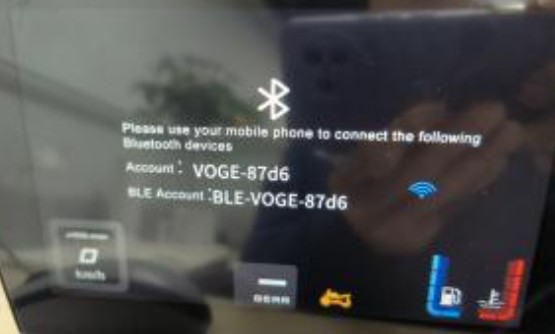
Put the cluster into update mode. With the ignition on: short press the arrow down button, then turn on the high beam, put the side stand down and turn on the left indicator. Now long press the arrow down button until the screen shows the connection screen, then release:
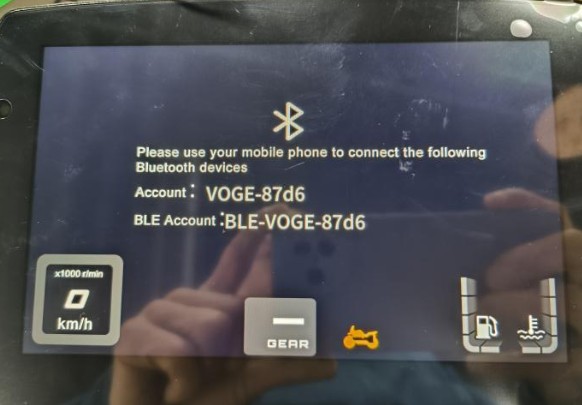
Note the account name shown (e.g.
VOGE-87d6). It is unique to your cluster.Set up your phone hotspot:
- SSID: exactly the name shown on the cluster (e.g.
VOGE-87d6) - Password:
88888888(eight 8s) - Band: 5 GHz
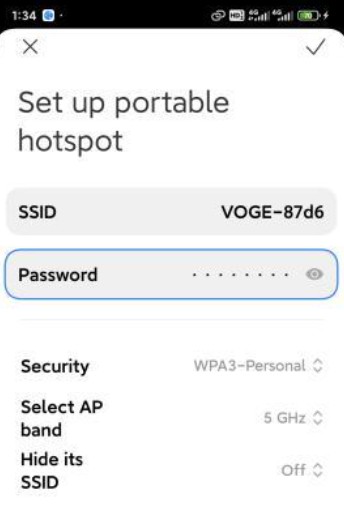
- SSID: exactly the name shown on the cluster (e.g.
Wait for the cluster to connect. The WiFi signal icon appears on the dashboard when it has joined your hotspot:
Open the Sansan app. It should show a connected state with the cluster's IP address and the firmware package contents (OS, MD5 and MCU files):
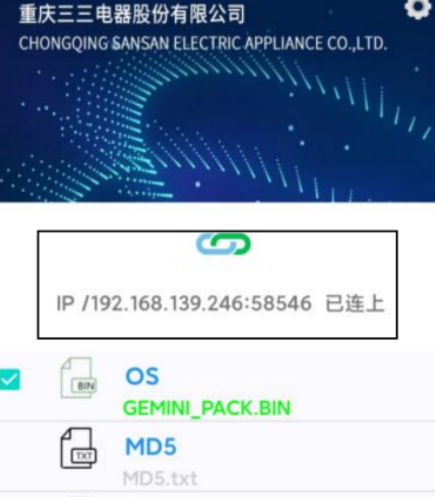
Confirm the MCU file listed matches your bike before continuing.
Tap the blue download arrow button in the app to upload the firmware to the cluster.
When the cluster shows the confirmation prompt, press the ENT button on the left switchgear to begin the upgrade:
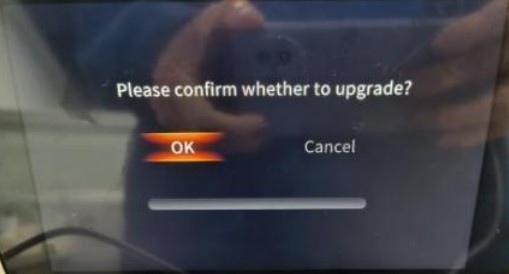
The upgrade runs in two stages, MCU first and then the display chip. Expect a black screen for around 30 seconds between the stages. This is normal, don't touch anything.
After
UPDATING SUCCESSappears the screen goes black again. Wait 6 minutes without touching anything until the cluster restarts on its own. Do not disconnect anything before that has happened. The manufacturer's document then describes fully power cycling the bike by disconnecting and reconnecting the battery positive terminal.Check that the version screen now shows SS621X13-03 and that everything works.
Sources
- Official Sansan/Voge upgrade instruction document "Instruction for upgrade instrument of SR4Max" (2025-01-15), supplied by Voge China support via a European dealer
- Recovery verified by an SR4 Max Radar owner who restored a cluster that had been flashed with pre-2025 DS900X firmware (SS621X11), including version screen photos from before and after the wrong flash
Have you used this procedure, or do you have version strings from before and after an upgrade? Send us the details, especially if your cluster has an MCU version not listed above.